
You are using an out of date browser. It may not display this or other websites correctly.
You should upgrade or use an alternative browser.
You should upgrade or use an alternative browser.

simond
Western Thunderer
The FDM packing cases were rather more successful than today’s attempt to produce some barrels using the same material and process. These are rather disappointing.
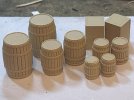
The grooves between the staves are clearly far too prominent, but more irritatingly the hoops have developed some kind of lumps coincident with the grooves. I’m sure I could clean it off but that would be a gazillion times more effort than it’s worth! Whilst I can make the grooves less prominent I don’t think this will work, and I’ll try to 3DP using resin at some point.
Similarly, the tea chests are “just about” ok, Col @Eastsidepilot will struggle to see the nails, but the edge strips are there! Again, I think resin rather than FDM.
The grooves between the staves are clearly far too prominent, but more irritatingly the hoops have developed some kind of lumps coincident with the grooves. I’m sure I could clean it off but that would be a gazillion times more effort than it’s worth! Whilst I can make the grooves less prominent I don’t think this will work, and I’ll try to 3DP using resin at some point.
Similarly, the tea chests are “just about” ok, Col @Eastsidepilot will struggle to see the nails, but the edge strips are there! Again, I think resin rather than FDM.


Eastsidepilot
Western Thunderer
That's a shame about the barrels Simon, I know nothing about 3D printers so can't advise other than they would leakThe FDM packing cases were rather more successful than today’s attempt to produce some barrels using the same material and process. These are rather disappointing.
View attachment 245090
The grooves between the staves are clearly far too prominent, but more irritatingly the hoops have developed some kind of lumps coincident with the grooves. I’m sure I could clean it off but that would be a gazillion times more effort than it’s worth! Whilst I can make the grooves less prominent I don’t think this will work, and I’ll try to 3DP using resin at some point.
Similarly, the tea chests are “just about” ok, Col @Eastsidepilot will struggle to see the nails, but the edge strips are there! Again, I think resin rather than FDM.


simond
Western Thunderer
hi Phil,Simon,
Can you hide the barrels in amongst some better printed ones, once you have perfected the printing?
I could, but there seems little point. I’ll get some beige or vanilla resin at some point, and simply print in resin.
“The experiment was a success: the products are unusable.”
cheers
Simon

Giles
Western Thunderer
Repair Elegoo Saturn 8k power switch
simond
Western Thunderer
Just for the record, print #8 went according to plan too.
way back in June I had a run of print failures
et seq.
I am now pretty much convinced it was a dodgy switch, and the new one has resolved the issue.
Unfortunately I did not take photos of the modifications as I proceeded but in brief, in case anyone needs it;
I opened the back of the printer, (4 csk screws) and removed the motherboard - this is a complete PITA as the screws are hidden behind the lip of the back of the main chassis moulding. I drilled holes to get a screwdriver in and remove the 2 panhead screws that secure it. I did photograph the connections before removing them, and actually labelled the plugs with an indelible fine tip felt pen. There are 4? green connectors on the right, two ribbons (the main screen and the front screen) and a bizarrely awkward USB A on the left.
Then I removed the underside of the printer. From memory there are 8 panheads to remove, around the outside, I didn't undo the ones in the middle. The base will pull out with the LED, lampshade and cooling system. The wires are probably tangled. Be very careful of the ribbon cables.
The switch is mounted on a small pcb secured to the front of the chassis with two screws. I removed it, unsoldered the switch and soldered in a new toggle switch using a couple of bits of 1mm dia copper wire. The switch cover was drilled to accept the new switch and then the whole assembly was relocated with the screws, and some glue on the old button to stop it moving in the chassis. I glued a small piece of plasticard on top of the pcb to stop any contact between the solder lugs of the switch (which I shortened after soldering the wire on) and the PCB.
Once that was done, it was a case of reassembly starting with the base. The wires from the switch to the circuit board were too short, and had been fed through the cooling radiator so I lengthened them with some suitable wire and shrinkwrap. If that needs doing, do use wire that is good for 5A continuous. I only put two screws in initially.
Reinstall motherboard and use tweezers and screwdriver to reinsert and tighten teh two screws. Reconnect all plugs and sockets.
Quick check it works, lights up, Z drive etc.
Fit rear cover, and all the remaining screws underneath.
Eventually back together and do a print. All worked fine first time. Phew.
way back in June I had a run of print failures
SimonD’s workbench
Thanks Rob, if you’re slicing strips off the edge of a sheet, how narrow can you go? I understand it’ll depend on thickness. Do you find the strips curl? ta Simon
www.westernthunder.co.uk
I am now pretty much convinced it was a dodgy switch, and the new one has resolved the issue.
Unfortunately I did not take photos of the modifications as I proceeded but in brief, in case anyone needs it;
I opened the back of the printer, (4 csk screws) and removed the motherboard - this is a complete PITA as the screws are hidden behind the lip of the back of the main chassis moulding. I drilled holes to get a screwdriver in and remove the 2 panhead screws that secure it. I did photograph the connections before removing them, and actually labelled the plugs with an indelible fine tip felt pen. There are 4? green connectors on the right, two ribbons (the main screen and the front screen) and a bizarrely awkward USB A on the left.
Then I removed the underside of the printer. From memory there are 8 panheads to remove, around the outside, I didn't undo the ones in the middle. The base will pull out with the LED, lampshade and cooling system. The wires are probably tangled. Be very careful of the ribbon cables.
The switch is mounted on a small pcb secured to the front of the chassis with two screws. I removed it, unsoldered the switch and soldered in a new toggle switch using a couple of bits of 1mm dia copper wire. The switch cover was drilled to accept the new switch and then the whole assembly was relocated with the screws, and some glue on the old button to stop it moving in the chassis. I glued a small piece of plasticard on top of the pcb to stop any contact between the solder lugs of the switch (which I shortened after soldering the wire on) and the PCB.
Once that was done, it was a case of reassembly starting with the base. The wires from the switch to the circuit board were too short, and had been fed through the cooling radiator so I lengthened them with some suitable wire and shrinkwrap. If that needs doing, do use wire that is good for 5A continuous. I only put two screws in initially.
Reinstall motherboard and use tweezers and screwdriver to reinsert and tighten teh two screws. Reconnect all plugs and sockets.
Quick check it works, lights up, Z drive etc.
Fit rear cover, and all the remaining screws underneath.
Eventually back together and do a print. All worked fine first time. Phew.
Last edited:
simond
Western Thunderer

I wanted a better way of cleaning my airbrush and didn’t want to buy a “cleaning kit”, so I came up with this

It is an FDM 3DP cyclone separator, the snout of the airbrush goes in the tube on the right, it causes a swirl within the cyclone part, the water/ipa/other solvent goes down the conical part and drains into the yoghurt pot and the air exits via the cylindrical outlet on the lid.
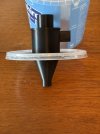
It works, but just not quite as well as I hoped, a faint cloud comes out of the exhaust, which doesn’t matter with water but may be unwelcome with more pungent solvents. I’ve added a foam filter on the outlet which has reduced that.
I think the airflow from the airbrush is probably not quite strong enough, so I might try making it a bit smaller, to try to make the swirl more rapid.
I’d quite like to extend the principle to filtering the IPA in the resin printer wash tank. That would be quite a neat trick, and might extend the life of the IPA.

michael080
Western Thunderer
great idea. I will print a test cyclone asap.
you can do funny things with a vortex: vortex tube
Michael
you can do funny things with a vortex: vortex tube
Michael

paulc
Western Thunderer
I've noticed a faint cloud comes up from the air brush cleaning pots that you can buy so i wouldn't knock yourself around too much . The air has to escape somewhere.View attachment 245369
I wanted a better way of cleaning my airbrush and didn’t want to buy a “cleaning kit”, so I came up with this
View attachment 245370
It is an FDM 3DP cyclone separator, the snout of the airbrush goes in the tube on the right, it causes a swirl within the cyclone part, the water/ipa/other solvent goes down the conical part and drains into the yoghurt pot and the air exits via the cylindrical outlet on the lid.
View attachment 245383
It works, but just not quite as well as I hoped, a faint cloud comes out of the exhaust, which doesn’t matter with water but may be unwelcome with more pungent solvents. I’ve added a foam filter on the outlet which has reduced that.
I think the airflow from the airbrush is probably not quite strong enough, so I might try making it a bit smaller, to try to make the swirl more rapid.
I’d quite like to extend the principle to filtering the IPA in the resin printer wash tank. That would be quite a neat trick, and might extend the life of the IPA.
simond
Western Thunderer
Looking at references for cyclone separators, they are very good with the big bits, but as the particle size reduces, they are less effective. And of course, the whole point of an airbrush is to uniformly atomise the paint into very small droplets, so I guess there is an element of chasing one’s own tail. As a first iteration, it works, which is a good start.I've noticed a faint cloud comes up from the air brush cleaning pots that you can buy so i wouldn't knock yourself around too much . The air has to escape somewhere.
As the CAD is parametric, it’s trivially simple to try a reduced diameter and a longer cone, and maybe to modify the exhaust port shape. I’ll get round to it and will report back.

Osgood
Western Thunderer
Neat cleaning method!
You could always try putting another in series!
Here's one I knockedup about earlier - a group of 4 set on top of a hopper which collected the dust off-take from each cyclone.
One of the cyclone bodies is missing (probably scarpered when it saw the Komatsu approaching....).
These were installed secondhand circa 1960 as a dust collector on a rotary mineral drying kiln.
The unit was originally fitted to a refuse incinerator on the Rainham (?) Marshes - built in 1936 but abandoned after a short life as it was cheaper to simply dump the rubbish
The fan drew air/dust from a rotary drying barrel through cyclones which I believe is normal (vacuum in the cyclone) - in Simonworld your airbrush is pushing air through cyclone thus pressurising it which possibly makes it less efficient.
But in any case it will only remove droplets - fine particles (vapour) will be carried through into exhaust from cyclone.

You could always try putting another in series!
Here's one I knocked
One of the cyclone bodies is missing (probably scarpered when it saw the Komatsu approaching....).
These were installed secondhand circa 1960 as a dust collector on a rotary mineral drying kiln.
The unit was originally fitted to a refuse incinerator on the Rainham (?) Marshes - built in 1936 but abandoned after a short life as it was cheaper to simply dump the rubbish
The fan drew air/dust from a rotary drying barrel through cyclones which I believe is normal (vacuum in the cyclone) - in Simonworld your airbrush is pushing air through cyclone thus pressurising it which possibly makes it less efficient.
But in any case it will only remove droplets - fine particles (vapour) will be carried through into exhaust from cyclone.
Last edited:
simond
Western Thunderer
your airbrush is pushing air through cyclone thus pressurising it which possibly makes it less efficient.
Hi Tony,
Yes it is pushing. What was very evident when I tried it by blowing into the intake nozzle was that 100% of my breath came out of the top, there was literally zero from the waste port at the end of the cone.
Maybe adding a suction fan (or MrsD’s new vacuum cleaner) to the exhaust port….
simond
Western Thunderer
Wow, over a month...
It's been exciting, one could say, rivetting...

Honestly, I can't be bothered to count them, but lots, and there are lots on the inside too. So, lots and lots.
It's an N4 loco coal wagon with Thomas brake, and I am about to find out whether I can support it well enough so that it prints right first time.
It's been exciting, one could say, rivetting...
Honestly, I can't be bothered to count them, but lots, and there are lots on the inside too. So, lots and lots.
It's an N4 loco coal wagon with Thomas brake, and I am about to find out whether I can support it well enough so that it prints right first time.
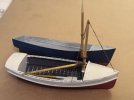
My Dad restored an identical boat -he named her "Maudie Spickett"- and we put in a Stuart Turner 8HP twin that came out of a barge. She got up on the plane very nicely! I wonder where she is now?

daifly
Western Thunderer
SimonIt's an N4 loco coal wagon with Thomas brake, and I am about to find out whether I can support it well enough so that it prints right first time.
That drawing has a most peculiar, almost reversed, perspective! Very disturbing.
Dave