SimonD’s workbench

Thunderbirds are GO!
  • simond

    Western Thunderer
    Thanks to everyone who provided help, comment and moral support, the debacles with the local planning department have been concluded and we have permission for the extension. The appeal officer was very clear that there were no reasonable grounds to reject, and the original judgement was flawed in matters of fact. A great result if a bit tedious having to go through two applications and an appeal process.

    There is now quite a lot of work to be done!
     
    Signals. Again…
  • simond

    Western Thunderer
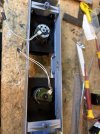
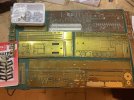
    Some of the metal I purchased was to make the trimmers for this.

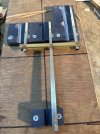
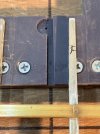
    The posts are @Jon Fitness etches.
    image.jpg

    Which will replace this which may have been “squirrelled” on JM’s outdoor line

    image.jpg

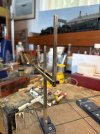
    The jig is a few 3DP pieces and provides the cross hole for the wire to the lamp, and location to solder on the pivot tube.

    image.jpg

    image.jpg

    I shall do them later.

    Progress so far is quite pleasing :)


    Just found the previous attempt

    Post in thread 'SimonD’s workbench'
    SimonD’s workbench
     
    Last edited:
    Dapol Signals with Arduinos
  • simond

    Western Thunderer
    Being curious (and you may read that as you wish) I obtained a Dapol signal to see if I could interface it to my Arduino-CAN set up.

    The signals are not at all bad, and are much cheaper than custom made, and much easier than DIY. I like building signals, but they are a fair task, and so an RTP solution is welcome, at least for the simple stuff.

    Being curious, I took it to bits. It would appear that a previous owner had done the same as the screws securing the base to the box were missing.

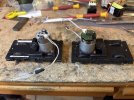
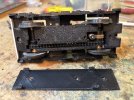
    in simple terms, the signal is spring loaded to the off position (it’s an LMS UQ), don’t know if the GW are spring loaded “up” hence danger, or “off”) and a curved arm on a standard 9g servo pushes the actuating rod to move the arm. There are two circuit boards in the box, one to rectify and regulate the voltage, and one to drive the servo.

    The same board, with missing components added, would do a junction signal. There is room for the second servo below the first. There are spring pins to carry current to the lamp. Altogether, a decent job.

    image.jpg

    The signal is operated by means of an SPCO switch. I will order a few optoisolators, because I’m confident that I can replicate the CO function using the Arduino output, which will turn the optos on or off, and they will, I hope, switch the signal.

    The other option is to junk the Dapol control system and simply use the Arduino to drive the servo directly, as I do with DIY signals, but that seems a bit unnecessary, and warranty busting.

    I’m still left with the question; why they didn’t design it so the actuator box was screwed to the baseboard, and the signal simply plugged in. I’m sure this would have been more popular as the vulnerable bit could easily be removed for transport, or layout cleaning, rather than being fixed sticking out. I guess this way is very simple, and the footprint above ground is pretty much scale.

    More soon.
    Simon
     
    Laser settings
  • simond

    Western Thunderer
    Last weekend I failed to laser-cut some W irons for my ongoing wagon projects, and it became obvious that my ancient Chinese laser was not working well. It lives in the garage (because it smells, even with a fierce extract system) and it was a bit cold, but I persevered. I discovered that two of the mirrors had cracked, and one of them was actually broken. I effected a temporary repair and ordered some replacements.

    I also stopped being a skinflint, and purchased a new Lightburn licence. My old one had expired in 2018 - they last for ever, but you need a valid licence for updates, so I updated. Should have done so years ago…

    I have not fitted the new mirrors yet, job for tomorrow, but I did run the material test cuts that Lightburn provides: I replaced the original controller in the laser (it’s a K40) with a Smoothieboard, though I think I’d use a GRBL if I were doing it now. I think I ought to dig into the firmware settings because the power range is rather odd, the laser won’t light up at less than 5% and is flat out at 23%, and the inertia acceleration and deceleration settings do not seem to prevent vibration and inaccurate cutting at speeds above around 40-50mm/s, but with these limitations in mind, I was able to run test matrices for several materials this evening. Presumably with replacement mirrors it’ll be a bit better.

    2mm MDF
    image.jpg
    Nice clean cuts at 22mm/s and 21%
    good engraving at 40-44mm/s and 9-15%

    1.1mm Acrylic
    image.jpg
    Difficult to photograph! A lot of melting, I suspect it would be better cutting larger parts, or with more space between adjacent cuts.
    Best cut at 4mm/s and 7%
    Engraving gave nice marking at 44mm/s and 9-13%
    Note the whole test plaque is distorted. I’m not sure this is a grade of acrylic intended for laser.

    1mm Greyboard
    image.jpg

    Cut very nicely at 44mm/s and 23%.
    Engraved cleanly at 26mm/s and 7%, but 44 & 9 is nearly as good and nearly twice as fast.
    note, it started smouldering at 4mm/s & 9% and I was turning the laser off & on manually to get a complete plaque

    0.2mm Ivory card
    image.jpg
    Lots of singeing and smouldering!
    cleanest cut at 31mm/s and 13%
    engraving 13mm/s and 5%

    and Trotec, 0.8mm
    image.jpg
    This is sold as a laserable material, but it does seem to melt at higher powers
    clean cut at 35mm/s and 19%, same speed and 9% gives a clean engraved line.

    I shall replace the mirrors tomorrow, and have a go at my W irons.

     
    Repair Elegoo Saturn 8k power switch
  • simond

    Western Thunderer
    Just for the record, print #8 went according to plan too.

    way back in June I had a run of print failures
    et seq.

    I am now pretty much convinced it was a dodgy switch, and the new one has resolved the issue.

    Unfortunately I did not take photos of the modifications as I proceeded but in brief, in case anyone needs it;

    I opened the back of the printer, (4 csk screws) and removed the motherboard - this is a complete PITA as the screws are hidden behind the lip of the back of the main chassis moulding. I drilled holes to get a screwdriver in and remove the 2 panhead screws that secure it. I did photograph the connections before removing them, and actually labelled the plugs with an indelible fine tip felt pen. There are 4? green connectors on the right, two ribbons (the main screen and the front screen) and a bizarrely awkward USB A on the left.

    Then I removed the underside of the printer. From memory there are 8 panheads to remove, around the outside, I didn't undo the ones in the middle. The base will pull out with the LED, lampshade and cooling system. The wires are probably tangled. Be very careful of the ribbon cables.

    The switch is mounted on a small pcb secured to the front of the chassis with two screws. I removed it, unsoldered the switch and soldered in a new toggle switch using a couple of bits of 1mm dia copper wire. The switch cover was drilled to accept the new switch and then the whole assembly was relocated with the screws, and some glue on the old button to stop it moving in the chassis. I glued a small piece of plasticard on top of the pcb to stop any contact between the solder lugs of the switch (which I shortened after soldering the wire on) and the PCB.

    Once that was done, it was a case of reassembly starting with the base. The wires from the switch to the circuit board were too short, and had been fed through the cooling radiator so I lengthened them with some suitable wire and shrinkwrap. If that needs doing, do use wire that is good for 5A continuous. I only put two screws in initially.

    Reinstall motherboard and use tweezers and screwdriver to reinsert and tighten teh two screws. Reconnect all plugs and sockets.
    Quick check it works, lights up, Z drive etc.
    Fit rear cover, and all the remaining screws underneath.

    Eventually back together and do a print. All worked fine first time. Phew.
     
    Last edited:
    DLOS Pickups
  • simond

    Western Thunderer
    I had already fitted the pickups to the Manor, but had to remove them to fit the springs and the brake hangers. I had printed the bushes as it’s quicker and more repeatable than turning by hand, but it is an easy lathe job of course.

    The pickup design is based on sketches given to me by David LO Smith, who was a talented model engineer (and talented real engineer too!)

    These pick-ups are easy to insert and remove without disturbing the wheels or motion, and are "floating" in that they react the contact pressure of one wheel on it's mate rather than on the chassis.

    I say printing is “more repeatable” but for some reason the all the smaller bushes were tight in the springs, and prevented the springs working as they should, so having it all in bits means doing it right this time! Along with a set of back-to-back jigs for assembling split axles, some brake bits, and an ashpan, I printed new bushes last night, and as people ask, I thought having some photos all in one place would be good:

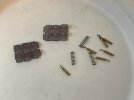
    The actual pickups are 11mm lengths of brass rod with the ends cleaned but not domed or chamfered. One end has a small hole a couple of mm deep as a solder pocket, and the wires are soldered in. I use “Hochflexibles Kabel” that came from ESU via one of the DCC suppliers. It’s very thin, and as the name suggests, highly flexible. The OD over the insulation is 0.5mm.

    The smaller bushes insulate the pickups from the spring, and the larger bushes are secured in the frames with epoxy or cyano.

    The springs are Premier Components 3-link coupling springs - there are plenty left over from my own wagon projects which use Peco type transverse wire springs for coupling and buffers.

    image.jpg

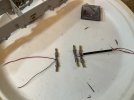
    The tags of wire are where I cut the old wires off. I shall remove them and solder in new wires.

    image.jpg

    The frame bush and spring bush.


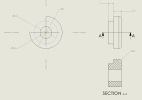
    Drawings - the pick-up itself

    1762693338890.png

    Spring Bush

    1762693022978.png

    Frame Bush

    1762693150796.png

    image.jpg

    spring bushes, pickups and wires assembled.

    the great advantage of this design is that the pickups can be removed without disturbing the wheels & motion.

    image.jpg

    rear pickups inserted in frame bushes (wrong way round, red on the right when the frames are the right way up!)

    image.jpg

    And the other two pairs.

    I’m going to take them out again whilst I paint the chassis, but you can see how easy it is.
     
    Last edited:
    Top