7mm Mickoo's Commercial Workbench

AndyH

Active Member
Maybe just waiting for a Urieka moment…

Fantastic modelling as always. Mick your posts over the past year, and beyond, have been an inspiration to improve my skills and add more 3D printed parts to models.
Nadelik lowen
 

Big Train James

Western Thunderer
The CAD render shows what's on the current NS sheets.......
I'm curious, do you use any aspect of the 3d model to create the etch artwork, for instance copying a face from a 3d object so that you have its 2d outline, which then gets placed into the artwork sheet? Or is the 3d model purely a visual reference, to make sure you have all the bits and pieces as intended and they are all arranged properly.

I tend to create fairly comprehensive 3d models of things I want to build, even if some part of the model will be produced in 2d media like etched metal. I never gave much thought until now as to how I might extract that information from the 3d model or if it is practical to do as I suggested above. There is often quite a bit more to do once the outline is established, things like half-etch elements, tabs and slots for construction, tabs for attachment to frets, etcetera, so the advantages of copying a face might be limited.

Jim
 

simond

Western Thunderer
Solidworks has a fairly comprehensive sheet metal tool suite, but despite efforts by our top CAD jockey (who is younger, faster, and far more experienced in that particular dark art than I will ever be), we have not found an easy way to generate etch outlines from 3D.

if there is, we’d love to hear about it. We don’t use much etch in our production, but every little helps, as the nice lady said on tv.
 

mickoo

Western Thunderer
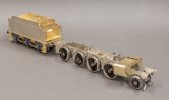
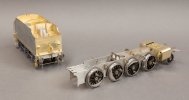
Some gentle work over the festive period, DA S&D 7F to be precise.

Pretty much straight out of the box to be honest, the 7F tenders were very basic and as far as I can tell not scoop fitted, hence the single stand on the footplate for the handbrake. a couple had the more modern front end with coal doors and lockers but this one (#7) did not.

I spent 10 minutes cleaning up one of the white metal axles boxes/springs and then looked at the other five, sod that and pressed print, they'll be spat out tomorrow some time and fitted.

The tablet catcher still needs to go on and a blanking plate over the hole in the footplate where the scoop stand would normally reside.

There's two holes in the top of the lockers I'm not sure of their purpose as yet and the two on the front bulkhead below the shovel plate are for the water supply gate valves, I have a print for the flange done already and will add the levers later.

The coal space will be full of coal so no need to get het up about being neat and cleaning in there, work smarter not harder.

IMG_7999.jpg

IMG_8000.jpg

IMG_8001.jpg
 

mickoo

Western Thunderer
I'm curious, do you use any aspect of the 3d model to create the etch artwork, for instance copying a face from a 3d object so that you have its 2d outline, which then gets placed into the artwork sheet? Or is the 3d model purely a visual reference, to make sure you have all the bits and pieces as intended and they are all arranged properly.

I tend to create fairly comprehensive 3d models of things I want to build, even if some part of the model will be produced in 2d media like etched metal. I never gave much thought until now as to how I might extract that information from the 3d model or if it is practical to do as I suggested above. There is often quite a bit more to do once the outline is established, things like half-etch elements, tabs and slots for construction, tabs for attachment to frets, etcetera, so the advantages of copying a face might be limited.

Jim
Jim, in short no.

The inverse actually, I take the 2D outline and extrude to the material thickness and then flip and twist the parts to build a virtual model. I did that with the B1 and it found several errors I'd missed that Mick Roffe (test building) also confirmed as he was going along.

On the S15 it worked really well right off the bat, only a few small tweaks needed, like moving a hole 0.3 mm instead of just filing it which just as easily be done. For me it's a massive game changer and time saver, especially if you then migrate to instructions. I think the B1 in the traditional format (W1 I did a few years back) would have taken 3 months, in this format it was five weeks.

Once I'd got my head around doing that it became much easier/faster to do and the next logical step was to break down the parts and then make images for instructions. In those I tend to add 3D rivets and bolt heads etc, that soaks up a fair bit of time and then I import the 3D masters for castings to fill in the blanks.

In AutoCad you can get an outline from a 3D object but all the edges are exploded so you need to join them all up again, however it will only do outlines for planar objects or more correctly, only planar faces. I can see that being a problem if say for instance you've added a radius to edges, say the nose on an EMD spartan cab in the 3D model, it's only going to break out the flat face and not take into account that half of the radius needs adding on to get the full sheet size; make sense?
 

mickoo

Western Thunderer
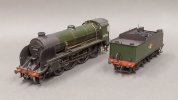
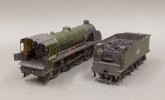
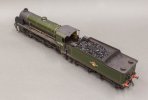
I thought I'd better kick this can down the street a bit further, it has taken rather a long time to be fair, most of that has been down slotting meeting times to hand over/collect for paint and weathering etc, the downside of a hand delivery mandate I prefer.

Anyway it's a MOK King Arthur, painted by Paul Moore and weathered by Neil Podbery but not the backhead, that's my dabbling.

The only thing left to do is add the drawbar, plug in the DCC and set up. All being well early next week the customer will get a nice message saying it's ready for delivery.

IMG_8008.jpg

IMG_8010.jpg

IMG_8011.jpg

IMG_8012.jpg

IMG_8013.jpg

IMG_8015.jpg

IMG_8016.jpg
 
Top