
You are using an out of date browser. It may not display this or other websites correctly.
You should upgrade or use an alternative browser.
You should upgrade or use an alternative browser.
Very Little Gravitas Indeed*
- Thread starter adrian
- Start date


paulc
Western Thunderer
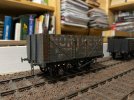
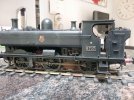
Hi Adrian , ref the oilbrushers. I find the 'Starship bay sludge' is a bit dark sometimes so use 'Starship filth' . Its what i use as a base colour for pretty much anything , locos included . Its very good at taking the blackness away .So after fading out the mistake of the rust colour wash - I picked out the ironwork yet again with the starship sludge / gunmetal mix yet again.
View attachment 234193
View attachment 234192

adrian
Flying Squad
sometimes so use 'Starship filth'
Thanks for that I'll give it a try on the next one.
adrian
Flying Squad
The modelling is ticking along nicely, but with the pressure of work it's just been an hour or so here and there and then I run out of time to sort out photos and update here. The following was completed a couple of months ago but with all the palaver over the MRJ indexes I forgo to post anything. I've sorted out the admin pages for the MRJ index so hopefully should be able to get that up to date over the next few weeks.
Anyway to report some of the progress from earlier in the year, as mentioned the weathered PO wagons, stage 2 was the chassis - applying a little rust with the oil brushers and working in some pigmentation powders.
Then I stippled in some underframe powders to represent the running grime.


I think I need to finish off the other two wagons before I decide whether this is the finished item or not - although I've just noticed I've forgotten the little handrail on the chassis.
The next distraction was something that has been sat on the shelf for more than a few years now but a recent tidy up and for future projects I wanted to test my DCC locos. So far all I have done is control them via the JMRI interface, throttle via a Sprog. I had the MERG kits for the command station and the hand controller. So a few weeks were spent building these up and now just need to sort out a case to fit them. I don't seem to have many photos of the build, I just followed the instructions as supplied. I did have problems with the surface mounted voltage regulator in the handheld unit, I must of overheated it when soldering in place. Fortunately there was sufficient room to replace it with a seperate component. There is still a 5 amp booster station to build as well.

It's also nice to have the speed control on the left hand side, being left handed it's perfectly placed for one hand operation.

Anyway to report some of the progress from earlier in the year, as mentioned the weathered PO wagons, stage 2 was the chassis - applying a little rust with the oil brushers and working in some pigmentation powders.
Then I stippled in some underframe powders to represent the running grime.
I think I need to finish off the other two wagons before I decide whether this is the finished item or not - although I've just noticed I've forgotten the little handrail on the chassis.
The next distraction was something that has been sat on the shelf for more than a few years now but a recent tidy up and for future projects I wanted to test my DCC locos. So far all I have done is control them via the JMRI interface, throttle via a Sprog. I had the MERG kits for the command station and the hand controller. So a few weeks were spent building these up and now just need to sort out a case to fit them. I don't seem to have many photos of the build, I just followed the instructions as supplied. I did have problems with the surface mounted voltage regulator in the handheld unit, I must of overheated it when soldering in place. Fortunately there was sufficient room to replace it with a seperate component. There is still a 5 amp booster station to build as well.
It's also nice to have the speed control on the left hand side, being left handed it's perfectly placed for one hand operation.

John Duffy
Western Thunderer
I do really like the wagon. Not so interested in the Start Trek stuff  as I honestly just don't understand it. There are certain words or abbreviations that simply fry my head and you got several of them in one paragraph!
Joking aside, nice work.
John
as I honestly just don't understand it. There are certain words or abbreviations that simply fry my head and you got several of them in one paragraph!Joking aside, nice work.
John

Chris Veitch
Western Thunderer
I do honestly understand your sentiment but I actually rather like the Star Trek stuff now. Having categorically stated that my 2mm scale 1.4m shunting plank will be strictly old-school wire-in-tube and DC, I’m now tinkering with an Arduino starter kit and designing 3DP servo mounts and a MERG membership seems more attractive than it used to and their DCC kits are starting to appeal...Not so interested in the Start Trek stuff
John Duffy
Western Thunderer
Sounds like they've got you! I do try, but almost instantly get distracted by a wagon kit.I do honestly understand your sentiment but I actually rather like the Star Trek stuff now. Having categorically stated that my 2mm scale 1.4m shunting plank will be strictly old-school wire-in-tube and DC, I’m now tinkering with an Arduino starter kit and designing 3DP servo mounts and a MERG membership seems more attractive than it used to and their DCC kits are starting to appeal...
I had never thought about 2mm but recently found myself returning to a layout at a local show. Perhaps for one of those Ikea shelves. Mmmmm
adrian
Flying Squad
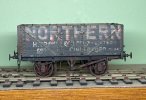
Modelling has been ticking along slowly but with everything else going on I never got the time to post updates. For this thread I simply record that the 3 PO wagons have been completed and weathered, finished off with various pigments. They are suitably grubby from a distance, close up I think I could do better to get some textures in but it got to the point where I thought if I keep trying to add a bit more I'll make them worse than there are rather than better. So I decided to stop there and try to improve on the next batch of wagons. I think one or two "flat" wagons for the next batch. Unfortunately only quick phone camera shots for now.

I think I ought to finish off the display track and take it outdoors for a photo session at some point.
I think I ought to finish off the display track and take it outdoors for a photo session at some point.
paulc
Western Thunderer
Evcellent work Adrian , knowing when to stop and walk away is a lesson in itself when weathering .Modelling has been ticking along slowly but with everything else going on I never got the time to post updates. For this thread I simply record that the 3 PO wagons have been completed and weathered, finished off with various pigments. They are suitably grubby from a distance, close up I think I could do better to get some textures in but it got to the point where I thought if I keep trying to add a bit more I'll make them worse than there are rather than better. So I decided to stop there and try to improve on the next batch of wagons. I think one or two "flat" wagons for the next batch. Unfortunately only quick phone camera shots for now.
View attachment 246274
I think I ought to finish off the display track and take it outdoors for a photo session at some point.
Ref the Powsides transfers , i think part of the issue is that they are pressfix so dont always totally bond to the surface which is fine when you spray a sealer coat over them but not so good when you want to distress an area and they start to peel away . Ask me how i know

adrian
Flying Squad
In addition to the loco building I decided another wagon build was required to slowly build up some freight stock and hopefully a fairly quick build to keep the interest. A quick root through the stash cupboard I dug out a Parkside Dundas Plate wagon kit.
Not many photos to post as it's been going together pretty much as supplied with few modifications. For once I actually read the instructions first rather than diving straight in. Step one was to fit the couplings to the end plates - which normally I would leave to last, however given the limited room at the end I went with the suggest build sequence.
Having said few modifications were required - this was the first one. As supplied if the tangs on the end of the coupling hook were bent as suppplied it wouldleave the springing quite light. IMHO nothing worse than soft springing and coupling hooks pulled out of the wagon so the slot in the rear was lengthened to stiffen up the spring.

The floor is supplied in 2 parts - so that is glued together on a flat glass plate. End plates, side plates glued on and then the solebars glued into slots on the floor. All fitted very nicely, little or no fettling required.
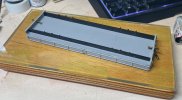

The main difference to the standard build - instead of the supplied Parkside plastic W irons I've gone with Ambis units and wire springing. The Ambis units need a little cutting up to make individual items - I soldered a short length of brass tube to the bearing carrier to hold the spring wire

They needed a little packing block under them to get them to the right height but all fitted quite nicely.

I'm still working through some of the DCC side for my locos as time and money afford. I sorted out a more suitable power supply for my MERG controller and still need to sort out a boxing arrangement for the CANCMD module but I thought I'd check the few loco's I have were working with the MERG controller. All went well until I got to my Midland 3F - using the last 4 digits from the loco number for the address 3215 - no response!! . I then spent an hour or so this weekend dismantling the loco, cleaning wheels, checking pickup continuity etc. All seemed fine so I dug out my Sprog 3. My Apple Mac laptop I'd just upgraded to the latest macOS Tahoe (26.0) with some trepidation I downloaded and installed the latest version of JMRI for DecoderPro. Trepidation because I'd had problems previously with macOS and JMRI communicating with the Sprog3. Fortunately no problem at all - it seemed all to work straight away with no problems.
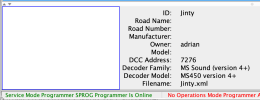
I used the DecoderPro "detect" option and it found the 3F DCC chip - it reported the address as 3125!! After all that there was nothing wrong with the loco I'd just managed to transpose 2 digits (3215 vs 3125) in the loco number hence the lack response. Once corrected all worked fine so I put the loco back together again.
The reason for testing the locos was that I'd recently bought a DCC sound decoder, stay alive and speaker for my Jinty. The rest of the weekend has been spent converting my Jinty to DCC and sound. All worked first time and no problems fitting the various parts.

Not many photos to post as it's been going together pretty much as supplied with few modifications. For once I actually read the instructions first rather than diving straight in. Step one was to fit the couplings to the end plates - which normally I would leave to last, however given the limited room at the end I went with the suggest build sequence.
Having said few modifications were required - this was the first one. As supplied if the tangs on the end of the coupling hook were bent as suppplied it wouldleave the springing quite light. IMHO nothing worse than soft springing and coupling hooks pulled out of the wagon so the slot in the rear was lengthened to stiffen up the spring.
The floor is supplied in 2 parts - so that is glued together on a flat glass plate. End plates, side plates glued on and then the solebars glued into slots on the floor. All fitted very nicely, little or no fettling required.
The main difference to the standard build - instead of the supplied Parkside plastic W irons I've gone with Ambis units and wire springing. The Ambis units need a little cutting up to make individual items - I soldered a short length of brass tube to the bearing carrier to hold the spring wire
They needed a little packing block under them to get them to the right height but all fitted quite nicely.
I'm still working through some of the DCC side for my locos as time and money afford. I sorted out a more suitable power supply for my MERG controller and still need to sort out a boxing arrangement for the CANCMD module but I thought I'd check the few loco's I have were working with the MERG controller. All went well until I got to my Midland 3F - using the last 4 digits from the loco number for the address 3215 - no response!!
. I then spent an hour or so this weekend dismantling the loco, cleaning wheels, checking pickup continuity etc. All seemed fine so I dug out my Sprog 3. My Apple Mac laptop I'd just upgraded to the latest macOS Tahoe (26.0) with some trepidation I downloaded and installed the latest version of JMRI for DecoderPro. Trepidation because I'd had problems previously with macOS and JMRI communicating with the Sprog3. Fortunately no problem at all - it seemed all to work straight away with no problems.I used the DecoderPro "detect" option and it found the 3F DCC chip - it reported the address as 3125!! After all that there was nothing wrong with the loco I'd just managed to transpose 2 digits (3215 vs 3125) in the loco number hence the lack response. Once corrected all worked fine so I put the loco back together again.
The reason for testing the locos was that I'd recently bought a DCC sound decoder, stay alive and speaker for my Jinty. The rest of the weekend has been spent converting my Jinty to DCC and sound. All worked first time and no problems fitting the various parts.
adrian
Flying Squad
That was a nice satisfying build and must be something of a record for me - less than a month from start to finish, with the exception of painting. It's now sat on the paint shop road along with a couple of other kits.
Highly recommended for a good kit - and relatively few modifications. As already covered the plastic W irons have been replaced with the sprung Ambis units then a tiny bit of detailing. The little cover plates on the axleboxes were in completely wrong position so were replaced with a slice of Evergreen plastic strip, the plastic tie rod between the W irons was too thick so has been replace with a strip of brass angle soldered on as L rather than ⅂ to have the appearance of being a thin strip but retain sufficient stiffness for manual handling without bending. Finally a little bit of 0.4 wire bent up for safety hangers on the brake pushrods and the tie down hooks along the sole bar.
It's still a little bit light but if I can find a suitable photo of a loaded wagon I thought a representative load with a few strips of steel strip would provide the weight required.


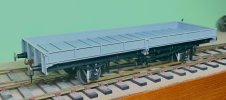

Highly recommended for a good kit - and relatively few modifications. As already covered the plastic W irons have been replaced with the sprung Ambis units then a tiny bit of detailing. The little cover plates on the axleboxes were in completely wrong position so were replaced with a slice of Evergreen plastic strip, the plastic tie rod between the W irons was too thick so has been replace with a strip of brass angle soldered on as L rather than ⅂ to have the appearance of being a thin strip but retain sufficient stiffness for manual handling without bending. Finally a little bit of 0.4 wire bent up for safety hangers on the brake pushrods and the tie down hooks along the sole bar.
It's still a little bit light but if I can find a suitable photo of a loaded wagon I thought a representative load with a few strips of steel strip would provide the weight required.

Yorkshire Dave
Western Thunderer
My Apple Mac laptop I'd just upgraded to the latest macOS Tahoe (26.0) with some trepidation I downloaded and installed the latest version of JMRI for DecoderPro. Trepidation because I'd had problems previously with macOS and JMRI communicating with the Sprog3. Fortunately no problem at all - it seemed all to work straight away with no problems.
I upgraded to an iMac from a PC laptop about a year ago (mainly due to Affinity Photo being more stable on the iMac and upgraded to macOS Tahoe) although I haven't installed JMRI. I still run JMRI on my (demoted) PC laptop now used purely for decoder programming as I also have ESU Lokprogrammer, which is not Mac compatible.
Does your Mac laptop have USB C (thunderbolt?) sockets, If so do you connect the Sprog3 to your Mac laptop via an USB B to C adapter or have a Sprog3 USB A to C cable?
adrian
Flying Squad
Yes the MacBook Air just has a couple of USB-C ports so I have an Anker 11-in-1 hub (HDMI and Display port video, ethernet, audio, SD and microSD card reader and a selection of USB sockets.I upgraded to an iMac from a PC laptop about a year ago (mainly due to Affinity Photo being more stable on the iMac and upgraded to macOS Tahoe) although I haven't installed JMRI. I still run JMRI on my (demoted) PC laptop now used purely for decoder programming as I also have ESU Lokprogrammer, which is not Mac compatible.
Does your Mac laptop have USB C (thunderbolt?) sockets, If so do you connect the Sprog3 to your Mac laptop via an USB B to C adapter or have a Sprog3 USB A to C cable?

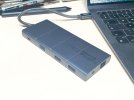
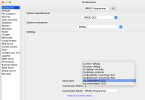
On connecting the SPROG appears labelled in the System settings - If DecoderPro throws an error about not found the Sprog it's usually the location ID has changed, depending on what else was connected. In this case the Location ID being 111

So in Decoder Pro Connection Preferences I have to match to the cu.usbmodem number 111 to establish the connection.
Yorkshire Dave
Western Thunderer
adrian
Flying Squad
Quite a few little projects going on at the moment so just trying to catch up on posting progress. This time electronics front, I've been trying to find some suitable boxes for housing various MERG projects and nothing really fits the bill. A recent purchase of a Bambu A1 3D printer has meant time practising 3D modelling skills and designing so custom project boxes.
This is for a MERG Servos 4 module which is controlling two Dingo Servo point motors on a simple test track. It's gone through 3 or 4 iterations as I've had to change switch positions to avoid interference with components on the circuit board.

There is a power switch on the rear - as it's occasional use only I've made it with an internal battery for a power supply to keep it simple. The switches on the top then operte the servo motors.

I designed it with a clip on lid as I wanted easy access internally to the D-connector and hooking up the Servo setting controller to adjust the settings.

Final task was to learn how to design the lid with different colours, I have the A1 mini printer with the 4 spool AMS system so I should be able to build multi-coloured projects. Here I've tried printing the "track-plan" as part of the lid to try to indicate what the switch operation is.

Attention has now turned to designing a housing for the DCC CANCMD module.
This is for a MERG Servos 4 module which is controlling two Dingo Servo point motors on a simple test track. It's gone through 3 or 4 iterations as I've had to change switch positions to avoid interference with components on the circuit board.
There is a power switch on the rear - as it's occasional use only I've made it with an internal battery for a power supply to keep it simple. The switches on the top then operte the servo motors.
I designed it with a clip on lid as I wanted easy access internally to the D-connector and hooking up the Servo setting controller to adjust the settings.
Final task was to learn how to design the lid with different colours, I have the A1 mini printer with the 4 spool AMS system so I should be able to build multi-coloured projects. Here I've tried printing the "track-plan" as part of the lid to try to indicate what the switch operation is.
Attention has now turned to designing a housing for the DCC CANCMD module.

David Halfpenny
Western Thunderer
LIKE !
A neat demo of the flexibility of 3D printing, and the sheer value of the tiny Bambu A1-mini, currently £139 Black Friday price.
Just one question about your elegant crossover module, if I may? I ask because I'm toying anxiously with 2-railing my garden line.
A neat demo of the flexibility of 3D printing, and the sheer value of the tiny Bambu A1-mini, currently £139 Black Friday price.
Just one question about your elegant crossover module, if I may? I ask because I'm toying anxiously with 2-railing my garden line.
- In what operating circumstances would one need two independent electrical switches for a crossover?
Yorkshire Dave
Western Thunderer
Just as a thought - points like this would operate as a 'pair' - couldn't you reduce the number of switches to one and use LEDs to show the route?
adrian
Flying Squad
2 updates in one night! Alternating between loco building I've been building up a few rolling stock kits to accompany the various loco's and build up my freight stock. More recently it seems to have been a number of plate wagons and various flat or bolster wagons of various origins. It's too cold for the paint shop to operate. I have a couple of MMP kits to work up to but I thought a nice simple one to start next would be a Connoisseur Macaw F. There's not too much to the kit but some of the whitemetal castings would need to be replaced so not quite a standard build. Mainly replacing the cast W irons with sprung etched replacement units.
Starting with the solebars, pressing out the half etched rivets and folding up into a channel section.
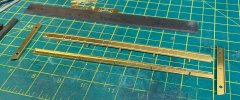
I know Jim pushes these as "pocket money" kits which they are for what you get. A single sheet of etched components and a couple of bags of castings but I'm not convinced that I'd be recommending them as beginner kits. The hold and fold struggled with the thin edge so to get a U shaped channel with 90deg. bends and to get it straight and flat needed quite a bit of platework bashing with a rawhide mallet and some steel bar stock.
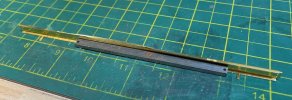
Likewise with the main body work it also need to be folded up and over to form the sides and top rails. I got there eventually with something I was happy with, but I suspect if this is a first kit for beginners then they might struggle to get a straight and square wagon out of it.


Side plates folded up and corner plates soldered on.

Having taken care to get everything straight and square then it all fitted together very well - so no problem from that side of the kit.
Solebars and buffer beams now fitted.
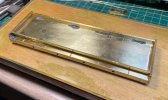
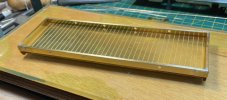

Starting with the solebars, pressing out the half etched rivets and folding up into a channel section.
I know Jim pushes these as "pocket money" kits which they are for what you get. A single sheet of etched components and a couple of bags of castings but I'm not convinced that I'd be recommending them as beginner kits. The hold and fold struggled with the thin edge so to get a U shaped channel with 90deg. bends and to get it straight and flat needed quite a bit of platework bashing with a rawhide mallet and some steel bar stock.
Likewise with the main body work it also need to be folded up and over to form the sides and top rails. I got there eventually with something I was happy with, but I suspect if this is a first kit for beginners then they might struggle to get a straight and square wagon out of it.
Side plates folded up and corner plates soldered on.
Having taken care to get everything straight and square then it all fitted together very well - so no problem from that side of the kit.
Solebars and buffer beams now fitted.
Last edited:

Dog Star
Western Thunderer
Given that the illustrations show how your metal working skills have achieved what I see as a decent result, can you start again (another kit maybe?) and photograph the steps from flat etch to final fold.... including the result of using the Hold and Fold?
Rgds, Graham
Rgds, Graham