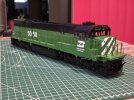
7mm Richards P48 US Thread

richard carr

Western Thunderer
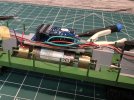
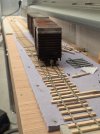
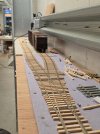
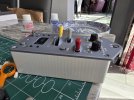
I've been too busy at work recently, so not too much has been done. We have managed to finish the final 2 spurs at the end of the branch.

20250510_144528.jpg

20250510_144544.jpg

These are all fully wired up and the switch motors are wired into the control panel.


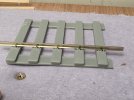
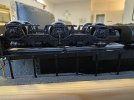
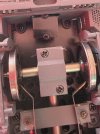
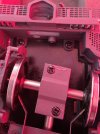
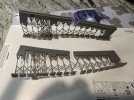
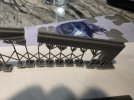
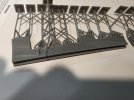
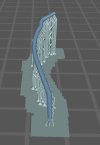
I have also been working on the 3D printed track bases, this is a test piece that does have holes large enough to get spikes through

20250504_164234 - Copy.jpg

20250504_164249.jpg

The plan is to draw up switch, as thats where it becomes a serious time saver, the available flex track for P48 is fine for plain track.

To get the holes to print, they need to be drawn well oversize, 1mm holes to print at about half that.
 

richard carr

Western Thunderer
I'm back in the US again, this time I'm in St Louis at the RPM meet.

Just before I came over I started work on the missing frames of the sunset SD40s.

20250719_205646.jpg

Here's the first go, and then in place

20250721_204500.jpg

These are far too high, it took a third go before I got them the right height.

20250721_204513.jpg
 

richard carr

Western Thunderer
I'm back home now and yesterday and today have been spent getting back to the Sunset SD9s.

One of the issues that I have found is that Sunset use an old style Kadee with the big spring on the outside, I much prefer the 745 version. Usually changing this is easy but not with the SD9. In addition to this the mounts for the kadees has broken off on most of mine.

Here's how they are fitted, it's pretty impossible to remove that screw in the middle of the pilot.

20250810_154531.jpg

So to remove it you have to remove the pilot first, then you can see how the support for the kadee is fixed in,

20250422_182038.jpg


but this one has broken off on one side.


20250810_154538.jpg

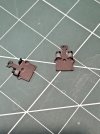
The broken supports

20250331_205256.jpg

So it's the 3 D printer to the rescue, here's a replacemnt support that glues in behind the pilot.

20250810_120307.jpg


20250810_120259.jpg


So now it all works again, and no big spring on the coupler.
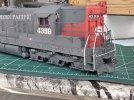
I've renumbered this one to 4359, which had lost it's pilot steps but kept pilot extension and without a plow.

20250810_131507.jpg

But most of the others need a plow, and SP had it's own take on this, as did a lot of railroads. I have quite a few examples on other models but I'm going to have to draw one and see if I can print it or if not etch it.
 

richard carr

Western Thunderer
The other thing I did yesterday was to start playing with the Proto Throttle.

20250810_131433.jpg

I bought this at the St Louis RPM meet, they are made by Iowa Scaled Engineering. I played with the demo one at the show for about 30 minutes, it was fun !

20250810_131518.jpg

The idea is that this works pretty much like a real locomotive, the top handle is the horn, the yellow handle the throttle, the middle grey handle the reversing lever and the red one is the brake.

To get it to work you need a wifi adaptor for you DCC system (mines Digitrax), a receiver for the Proto Throttle that tallks to the wifi receiver in addition to the throttle itself.

There's a 27 page manual that details how everything works, but the basic system works pretty much straight away so long as the acceleration and braking CV's on your decoder are set very high. The more time consuming bit it to make sure that when you press the bell button FO1 on your decoder is the bell, which it is on most US setup decoders, similarly FO2 is the horn and FO8 is the engine on.
It's the lighting set up that tends to to be different so I had to tell my PT that FO3 was the rear ditch lights and FO5 was the forward ones, but that is easy enough once you have read through the right part of the manual.

Richard
 

garethashenden

Western Thunderer
They're fun aren't they? Adds a new aspect to train control. I especially enjoy how train speed and engine sound can be decoupled, which is quite realistic. Full throttle and barely moving, or the inverse, is more realistic than just fast = loud.
 

JasonD

Western Thunderer
I'm back home now and yesterday and today have been spent getting back to the Sunset SD9s.

One of the issues that I have found is that Sunset use an old style Kadee with the big spring on the outside, I much prefer the 745 version. Usually changing this is easy but not with the SD9. In addition to this the mounts for the kadees has broken off on most of mine.

Here's how they are fitted, it's pretty impossible to remove that screw in the middle of the pilot.

View attachment 245458

So to remove it you have to remove the pilot first, then you can see how the support for the kadee is fixed in,

View attachment 245462


but this one has broken off on one side.


View attachment 245459

The broken supports

View attachment 245460

So it's the 3 D printer to the rescue, here's a replacemnt support that glues in behind the pilot.

View attachment 245461


View attachment 245463


So now it all works again, and no big spring on the coupler.
I've renumbered this one to 4359, which had lost it's pilot steps but kept pilot extension and without a plow.

View attachment 245464

But most of the others need a plow, and SP had it's own take on this, as did a lot of railroads. I have quite a few examples on other models but I'm going to have to draw one and see if I can print it or if not etch it.

SORRY!! All I want to work with is the SD9 cabside pic, none of the drive stuff. Anyway, I can see decal film around the road numbers.

I started O-scale decalling life with Walthers and Champ, moving on with Microscale, etc. The solvent is usually based around ammonia, weakening as the available film used got thinner. Cut the piece(s) with a new blade, knife held at a slight angle if possible, 90 degree cuts will show more. Soak the pieces in slightly warm distilled water ... no chalk streams purrleeze. Nearly said v v thin ammonia there. Now, puddle of the 'water' where the decal will go and lay the decal piece(s) in the puddle. Small brush or foam on a stick to make sure there are no air bubbles trapped or film edges showing, keep teasing the decals until your happy, then it's time for tea/coffee/etc.

I even remember the decal wrinkling once and I still went for a cuppa after swearing; when I came back ready to swear some more everything had seen sense and stretched flat. Don't ask me to do that again, but the blank film on the printed decal sheets is handy to test your skill level.

Gentle wipe to get rid of the evaporated bits of the puddle, or was that chalk from the ta... oh, ignore that.
 

richard carr

Western Thunderer
Hi Jason

Thanks for the tips.
That photo does make it look a lot worse than it is to the naked eye, thankfully and once it has a bit of varnish and weathering on it, it should disappear.

Richard
 

richard carr

Western Thunderer
I've been doing a bit more printing. The latest version of the SD40 frames came off the printer last night, they didn't go as well as I would like.
I suspect that I haven't used enough supports, but any help from others as to what has gone wrong would be good.

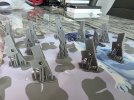
You can see how they are distorted at the ends in the middle, the larger ends the tops are distorted too. It didn't happen on the thicker ones but I did use more supports and printed in a different orientation

20250819_225138.jpg


20250819_225148.jpg

20250819_225155.jpg
 

mickoo

Western Thunderer
Right (from my perspective) you have two major issues, first is orientation, long thin beams like that at low angles will deform, it's the nature of SLA printers and the domed effect the FEP has when it peels. Ideally those should be printed vertically with the largest mass at the base.

However they may be too long to fit in the printer Z (vertical) axis so you might have to angle them, in which case your going to need to address your support type. Supports are like trees, a trunk and branches and like nature there's a ratio to stop the tree falling over, the more branches you have the fatter the trunk; for the number of branches you have you need a trunk at least 4-5 times thicker, possibly even more.

If you keep the trunk and multi branch support approach then try not to place all the trunks in a row, stagger them left and right, that'll reduce the items opportunity to sway when printing and reduce warping/deformation.

I've opted for a low print angle here to save time (3 instead of 7 hours if mounted vertically) but have massively supported it to prevent deformation and I'm happy to accept an hour or so post processing to get the item I want; rather than a wasted four hour print going straight in the bin.

Image2.jpg

The other way is one trunk one branch or two/three smaller branches at most.

Image.jpg

It uses more resin but in reality print failure is rare so less goes in the bin, it's something many struggle to understand and see it as a waste, it's not if every print is 90-95% success, plus the time saved, that print above is 17 hrs, if it fails from lack of supports it's another 17 hrs to redo.

Hope that helps.
 

JimG

Western Thunderer
I'll try that approach, hopefully tomorrow.

I must admit I wondered how you persuaded your slicer to have multiple branches at the top of thin supports. :) If I tried that on my older version of Chitubox, it would have extended most of the contacts straight to the base with an interconnecting lattice between them all.

Jim.
 

richard carr

Western Thunderer
I must admit I wondered how you persuaded your slicer to have multiple branches at the top of thin supports. :) If I tried that on my older version of Chitubox, it would have extended most of the contacts straight to the base with an interconnecting lattice between them all.

Jim.
Jim

Those are all auto generated by Chitubox Pro.


Richard
 

richard carr

Western Thunderer
Over the past 10 days I've been progressing the GE C30-7 (the GE equivalent of a SD40-2).

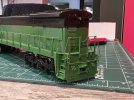
It's proved more difficult than I expected. I put the body back together after the bulk of the painting was complete.
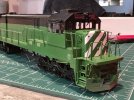
20250825_210146.jpg

The cab has been glazed with 0.5mm acryllic sheet, I've also put some on the number boards. They get painted white with black numbers.
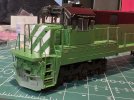
20250825_210159.jpg

I bought some acetate rod and turned that down to the right size to make the lenses for the marker lights.
You need to be very careful if you are using a carbide tool as these generate a lot of heat the acetate melts. I found it better to use an HSS tool to do this.
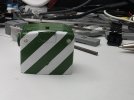
20250901_211559.jpg

FOr the head lights 3mm leds fit in the holes, the top one is in place here.
20250825_210228.jpg

The most challenging area has been fitting the decoder and speakers. There just isn't that much room in the loco.

Here's the full body inner layout. The blue support goes over the drive shaft to support a small HO speaker. Then the main support over the motor has the decoder on it. It's this shape so it fits in to the body .

The final support is in two parts to fit in a small tang band speaker.


20250901_205102.jpg


20250901_205109.jpg

20250901_205115.jpg
20250901_205122.jpg

Once I had this all wired up I went to test the running of the chassis. The best description was that it didn't run, the motor was turning but the drive wasn't getting through to the wheels on the rear truck. The result being it didn't move at all and the front truck just spun it's wheels.

I was also having trouble programming the decoder, mine needed the correct sound file loading, it's an ESU V5L and all I got from my Lokprogrammer was error reading/writing to decoder. It just would not program on the loco but once I had put it on a decoder tester (a zimo one !), it was fine the new sound file was loader complete with the latest firmware. I then put it back on loco and now you can program it on the loco.

The loco still wasn't moving though, it turned out that the grub screw wasn't biting the gear tower spigot. Fortunately I have been able to drill another hole in the universal joint and put in a new screw that does bite the spigot and it now runs well, once I had made a few small adjustments to the motor settings on the the decoder.

so this isn't too far away from completion, I just need to pain the lower part of each pilot black, complete the head light wiring and put it all back together.

 

richard carr

Western Thunderer
It's all back together now

20250910_221651.jpg


20250910_221656.jpg

20250910_221629.jpg

The paint work needs a bit of tidying up and detailing and it needs some kadees and some pipe work.

I've also ordered some more detailing decals from Switch Line Decals, I had never heard of them before but they have a good range of O scale decals. Then it just needs some weathering to finish it off, but nothing too heavy as these seem to have been kept fairly clean
 

Stephen

Western Thunderer
It's all back together now
View attachment 247417

The paint work needs a bit of tidying up and detailing and it needs some kadees and some pipe work.

I've also ordered some more detailing decals from Switch Line Decals, I had never heard of them before but they have a good range of O scale decals. Then it just needs some weathering to finish it off, but nothing too heavy as these seem to have been kept fairly clean

Decent looking loco - shame the 'real' locos didn't have a long working life compared to other locos of that era.

Going back a fair few posts, but what did you do regard to priming the loco - was there any lacquer to remove, and what primer did you use?

Cheers,

Stephen
 

richard carr

Western Thunderer
I think they had a longer life than you might think, many moved to shortlines in the late 90's early 2000's and there are a few still working today, according to google, not as many as SD40s but then there were almost 8 times as many SD40s as these.

I just sprayed it with etched primer, I've no idea if it had laquer on it, if it did I just went over it.
It did get a bit chipped but that was my fault for handling it a bit too roughly, but that will all get cleaned up and then weathered.
 
Top