Tips for photographing in the NRM Archive room.

Mike Trice

Western Thunderer
Yes I know it is now officially the Railway Museum but old habits die hard.

I have in the past (pre 2015) had access to various works photos in the NRMs archives and can recall how difficult it is to get photos without unwanted reflections. From memory there are overhead lights as well as a glass wall leaking light from the main hall. I have been luck in the past and they have let me use a scanner given that the original photos are actually prints of the originals however it looks as if the policy has changed and scanners are banned.

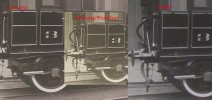
I did an experiment the other day comparing images between an ipad, Canon SX510 HS and Samsung phone. Lately I have been using the phone for general photos in the museum as it copes better with the lower light levels, especially in Station Hall (which reopens next Friday). Of the 3 the Canon gave a sharper image of the test line drawing so it is that I will be using in the archives. I have managed to 3D print myself a filter holder for the Canon so I will be trying out a polarizing filter to see if that helps.

From memory the photo albums are large ring binders and in the past I have been able to remove individual photos. Hopefully this will still be the case.

On the basis I cannot be the only one who has attempted this, does anyone have any advice?
 

David Mylchreest

Western Thunderer
I did some research on the BR Deep Bronze Green just before the lockdown and I remember that it was easier to use a camera that had a fold out and rotatable screen rather than a phone. The phone also had issues resolving small print IIRC
 

Mike Trice

Western Thunderer
I think I am resolved to using my Canon compact. I know what you mean regarding rotating screen which would have been useful when photographing drawings. I seem to recall getting back ache quite early in the process from constant leaning over. I will be taking a laptop stand in case I want to tilt the photos to avoid the glare assuming the staff will let me use it. If all else fails I can always sit underneath the table to cut out the overhead lights.
 

ovener

Western Thunderer
Would a mini tripod help (assuming the Canon has a strandard hole for one?
A remote shutter release might also be useful, both in terms of less movement but also saving your back!
 

David Mylchreest

Western Thunderer
I think I am resolved to using my Canon compact. I know what you mean regarding rotating screen which would have been useful when photographing drawings. I seem to recall getting back ache quite early in the process from constant leaning over. I will be taking a laptop stand in case I want to tilt the photos to avoid the glare assuming the staff will let me use it. If all else fails I can always sit underneath the table to cut out the overhead lights.
I used a reading stand IIRC. I used the ISO adjustment on the camera to make it OK for hand held, but I found 'noise' was an issue. A miniature tripod from Amazon would be an improvement but nothing can beat the camera stands TNA has :(
 

76043

Western Thunderer
I've been using the Google Photoscan app, it appears very competent for this sort of thing, bearing in mind photo restrictions. It takes five shots, first one frames the item, the rest are taken near to the four corners, this allows almost complete glare reduction and for a squareish result.

I'm used to medium format Hasselblad's for a living in an archive photo studio: I was impressed at the ease of use.
Tony
 

Mike Trice

Western Thunderer
Actually Photoscan has just given reasonable results. Did not remove all the glare in the test image but that is because I have a skylight overhead.

Will experiment more tomorrow.
 

Mike Trice

Western Thunderer
Using my Samsung phone, PhotoScan image 3000x2000 pixels 96dpi, normal image 4000 x 3000 pixels 72dpi.
Canon photos 4000x2248 pixels 180dpi.

I think the Canon wins.
 

76043

Western Thunderer
On the face of it Mike, the Samsung wins, it has a greater pixel count. Dpi is not a fixed number.

But image quality is made up of a huge amount of variables which as it's Friday night is difficult to go into.
Tony
 

Mike Trice

Western Thunderer
Well I am back and have a few things to report.

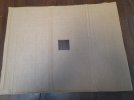
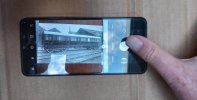
Having left for Yorkshire I belatedly came up with a cunning plan. A walk to the indoor market in Pickering and I was able to scrounge a large empty cardboard box. A visit to a hardware shope procurred a cheap knife. A few cuts later I had a piece of stout card with a 2" aperture in the middle. My phone was placed lens side down through the aperture and the outline marked:
20250927_132805.jpg

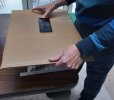
To use it the card is held above the photo, the image lined up and I can just reach the shutter button:
20250927_132642.jpg

This is my view through the phone's camera, still needing to be aligned. The glare in this instance is on my camera screen not the image:
20250927_132709.jpg

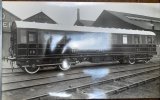
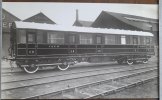
So here is the photo taken on my table at home where I have a skylight directly above me complete with reflections:
20250927_132724.jpg

The same photograph taken with my Heath Robinson cardboard light block:
20250927_132655.jpg

Well I turned up at the NRM Reader's Room and got some funny looks and a degree of curiosity. Did it work? Yes it did.

In spite of the above I was the only one in the room so the staff turned the overhead lights off for me. Same result without the faff.

All photos on the day were taken with the straight Samsung's camera at 1 magnification. I did also take some macro shots for some of the details.

Having some time on my hands I also tried taking some images with PhotoMyne to compare, 44 in total. Then I found I cannot export the images out of PhotoMyne to my phone's SD card or export in any other way.

When I first tried PhotoMyne I was able to export them! I think what has happened is when you first install PhotoMyne it gives you 3 days of access to the full version then restricts functionality. If I now want access to my PhotoMyne photos I need to buy a license. No thank you. Thank goodness I did not use it in earnest.
 

simond

Western Thunderer
Presumably loo roll tubes or paper cups could be used as legs to keep the light shade (and phone camera) horizontal and a set distance from the image.

Would it help?
 

Mike Trice

Western Thunderer
Probably. I tended to take at least two photos. One showing the whole card which includes the reference number and other details and one capturing just the photo itself. I would then, depending on whim, take a few macro close ups. This is much easier/quicker without any other form of support. The photos also vary in size so adjustment would be necessary between each shot.
 

Richard Spoors

Western Thunderer
Yes I know it is now officially the Railway Museum but old habits die hard.

I have in the past (pre 2015) had access to various works photos in the NRMs archives and can recall how difficult it is to get photos without unwanted reflections. From memory there are overhead lights as well as a glass wall leaking light from the main hall. I have been luck in the past and they have let me use a scanner given that the original photos are actually prints of the originals however it looks as if the policy has changed and scanners are banned.

I did an experiment the other day comparing images between an ipad, Canon SX510 HS and Samsung phone. Lately I have been using the phone for general photos in the museum as it copes better with the lower light levels, especially in Station Hall (which reopens next Friday). Of the 3 the Canon gave a sharper image of the test line drawing so it is that I will be using in the archives. I have managed to 3D print myself a filter holder for the Canon so I will be trying out a polarizing filter to see if that helps.

From memory the photo albums are large ring binders and in the past I have been able to remove individual photos. Hopefully this will still be the case.

On the basis I cannot be the only one who has attempted this, does anyone have any advice?
I'm a frequent visitor to the Search Engine. I use my iPhone to photograph drawings, however, I rely on an app: ProCamera - the next dimension in iOS mobile photography! The app has central hairlines which enables me to be sure the screen is horizontal in both x and y planes before taking a photograph. The biggest lighting problem is my own shadow, which can mean chosing another table or changing my position for photographs. I haven't photographed any other archive material.
Cheers
Richard
 
Top